


Schlage Home
4.06.30K Reviews
App Specs
- Version
- 8.3.0
- Updated On
- License
- Free
- Downloads
- 1,000,000+
- Developer
- Schlage Lock Company, LLC
- Categories
- House & Home
- Platform
- Android, iOS
Screenshots
 Analysis by AppCompare
I would start by treating Schlage Home as a companion for a compatible Schlage smart lock, not as a general home-security system. That distinction matters: the app is most useful when the lock itself is the part of your home you want to manage, and the experience depends on having a suitable lock installed and connected. If you are still choosing hardware, check that the specific lock you plan to use works with the app before building your routine around it.
What to check before relying on it
It is easy to focus on the phone app and overlook the door. Before setup, make sure the lock is fitted correctly, its batteries are in good condition, and the door closes and latches without needing a shove. A smart lock cannot compensate for a misaligned strike plate or a door that sticks, and problems that look like app trouble can begin with the mechanics.
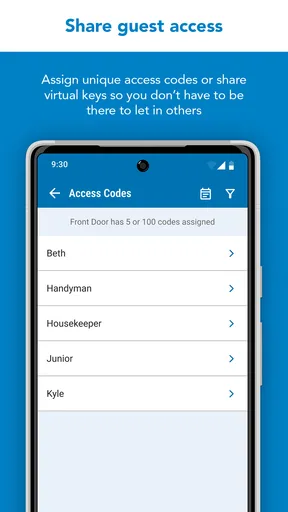
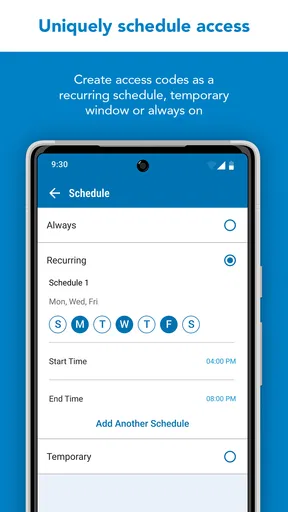
I would also decide who needs access and when before creating a routine. A household with one or two regular users has different needs from a home where a cleaner, dog walker, or contractor visits at changing times. Use the access options supported by your particular lock and app configuration, and remove access when it is no longer needed. That small bit of planning makes access management easier to review later.
Remote control deserves a practical check rather than blind trust. Test the lock while you are at home, then try the intended routine when you are away and can safely verify the result. If a remote action does not go through, avoid assuming the door changed state; check the app’s status and use another safe way to confirm before leaving the home unattended.
Everyday routines that make sense
A useful scenario is coming home with shopping while a family member is already inside. Instead of searching for keys, you can use the app-supported lock controls when the lock and connection are ready. Another is letting a visitor in while you are nearby but unable to reach the door; a temporary access arrangement may be more convenient than sharing a permanent key, provided your lock supports that workflow and you manage the access deliberately.
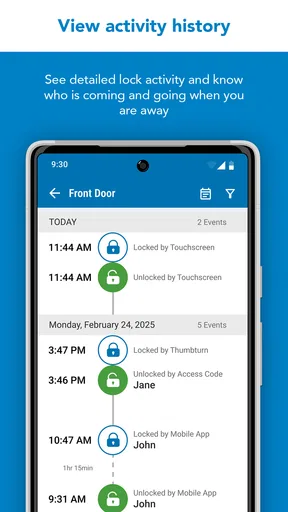
For a household that often forgets the last lock-up check, an activity record can help answer a specific question: whether someone used the lock and when. It is not the same as video footage, and it cannot tell you why a person came or what happened inside. I find that distinction important. Treat the record as a useful door-event history, not as a substitute for a camera, alarm, or a conversation with the people who share the home.
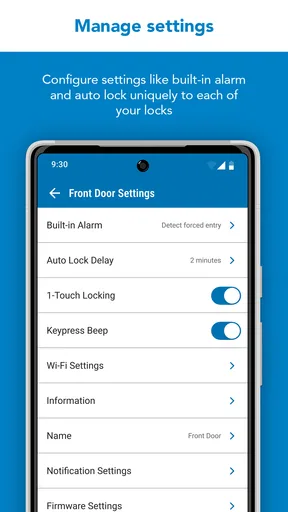
Automatic locking can help when everyone is rushing out, but I would test the timing and household routine before depending on it. A setting that suits a front door may be awkward if someone regularly steps outside briefly without taking a phone or key. The best setup is not necessarily the most automated one; it is the one that does not create a lockout risk for the people who use the door every day.
Worth Reading Before You Choose

Flipboard Shows What News Apps Must Do Beyond the Feed

Switching to Android Auto Means Rethinking Your Driving Routine

Google Calendar Makes a Crowded Week Easier to Manage

Ludo King Makes the Most of the Minutes Between Plans

Baby Panda World Brings Quick Play to Modern Phones, but Its Game Library Feels Busy

ESPN’s Live Game View Makes Following Close Games Easier
Where this fits among other options
Compared with carrying a conventional key, app-based control can make access changes and remote checks more convenient. Compared with a broader smart-home hub, a lock-focused app is narrower: that can be a benefit if you want to manage the door without navigating a sprawling collection of home devices, but it may feel limited if you expect one app to coordinate every part of your home.
Voice control or other smart-home connections can be appealing, but compatibility depends on the lock and the setup you own. I would choose based on the action you actually need—such as checking the door or managing access—rather than buying a lock on the assumption that every integration will work in the same way. If you only need a basic way to secure one door and do not want to maintain connected hardware, a standard lock may be simpler and more dependable for your habits.
Schlage Home is aimed at people who already use, or are considering, a compatible Schlage smart lock and want phone-based management. It is less compelling for renters who cannot change their hardware, people who prefer not to depend on a connected device, or anyone seeking a full alarm and camera system. The app can support a lock routine; it does not turn a lock into complete home monitoring.
Setting Up: As Easy as Pie
When I first downloaded the Schlage Home app, I was pleasantly surprised by how straightforward the setup process was. The app guides you through connecting your Schlage smart lock with step-by-step instructions that even my tech-averse grandma could follow. It's almost like having a tech-savvy friend walk you through the process.
Once you've got your lock connected, the app offers a user-friendly interface that's both sleek and intuitive. You're not drowning in complicated menus or settings—just the essentials, front and center. And honestly, that's a breath of fresh air in a world where apps can sometimes feel like a maze.
Security Features That Pack a Punch
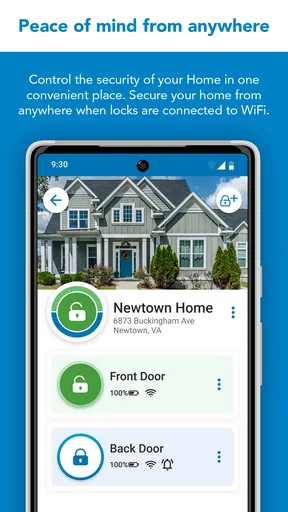
Now, onto the juicy part: the security features. The app lets you lock and unlock your door remotely, which is a lifesaver for those "Did I lock the door?" moments. You can also set up temporary access codes for guests or contractors, which is perfect if you're like me and not always home to let people in.
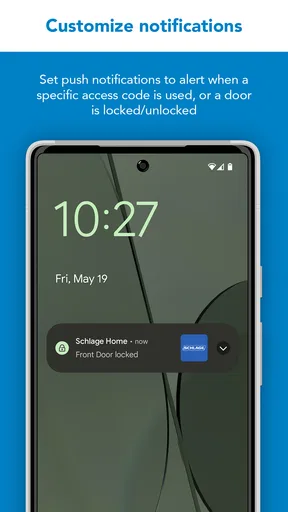
The app provides real-time notifications whenever your door is locked or unlocked, so you're always in the loop. And for those who love keeping tabs, the activity log gives you a detailed history of all interactions with your lock. It's like having a security camera for your door lock, minus the creepy factor.
Customization: Make It Your Own
One of the standout features is the ability to customize your lock settings. Want the door to auto-lock after a few minutes? You got it. Prefer to keep it unlocked during certain hours? The app's got you covered. It's all about tailoring the experience to fit your lifestyle and needs.
And let's not forget about the app's integration capabilities. If you're already knee-deep in the smart home ecosystem, Schlage Home plays nice with Alexa and Google Assistant. Imagine walking into your home and commanding your lock with just your voice. Yeah, it's as cool as it sounds.
Staying Connected: Anywhere, Anytime
Whether you're on a beach vacation or just out for a grocery run, the app keeps you connected with your home security. The remote access feature means you can manage your lock from anywhere in the world. It's peace of mind in the palm of your hand, and honestly, isn't that what we all want?
One nifty feature is setting up custom alerts. Want to know if someone enters your home during specific hours? Set up a notification. It’s like having an extra pair of eyes on your home when you can't be there.
Checking a problem in the right order
If the app seems stuck or a lock command does not appear to work, I would start with the simplest checks: confirm the phone has a working connection, reopen the app, and check whether the lock responds locally. Then look at the lock’s battery condition and whether the door is physically latching smoothly. These checks help separate a connection problem from a mechanical one without repeatedly sending commands.
If you are setting up access for another person, verify the details on both sides: that the person has the intended instructions and that the access is still appropriate for their visit. A temporary code is only useful if the guest knows how and when to use it; an unclear handoff can create more friction than simply arranging to meet them. For a time-sensitive visit, test the process in advance rather than discovering a snag when someone is waiting outside.
When an alert does not arrive, I would not treat silence as proof that nothing happened. Check the app directly and review the lock status or activity information available in your setup. Phone notification settings and connectivity can affect what you notice, while the lock’s own operation is a separate matter. If security is at stake, use a direct check of the door rather than relying solely on a notification.
When the app is not the cause
Smart-lock frustration often begins at the door. If the deadbolt is difficult to turn by hand, the door may be pressing against the frame or the bolt may not line up cleanly. Fixing that physical resistance is a better first step than repeatedly changing app settings. Likewise, a drained lock battery or an unstable connection can make a working app seem unreliable, so troubleshoot the device and the phone separately.
There is also a human side to access management. If several people share a home, agree on who is responsible for checking the door and how visitors should enter. An activity history can show that an interaction occurred, but it cannot resolve conflicting expectations or replace a clear household routine. I would keep a backup access method available and make sure everyone knows what to do if their phone is unavailable.
The app is not the right answer if your main concern is seeing what is happening inside or outside the home. A lock can report lock-related activity, but a camera or a dedicated alarm addresses different needs. Similarly, someone who wants a wholly offline routine may be happier with a traditional lock and physical keys than with the extra upkeep of a connected device.
Who will get the most from it
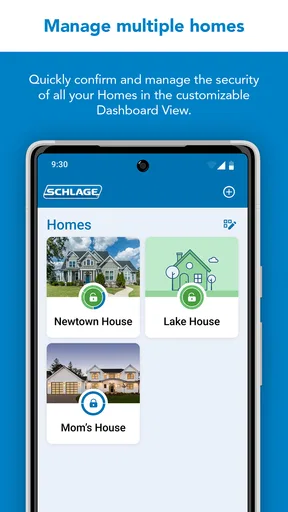
For an owner who already has a compatible lock, Schlage Home is a practical fit when remote management, access changes, or a quick status check would solve a recurring annoyance. It can be especially useful in a home where trusted visitors come and go, as long as the household is comfortable managing access and checking that the hardware remains in good shape.
I would be more cautious if you are choosing a lock solely for a promised ecosystem feature, or if you need a system that works identically across different brands. Compatibility and available functions can depend on the specific lock and setup. Before making a purchase, confirm the exact model and the tasks you expect to perform, rather than assuming that all Schlage locks or all smart-home arrangements behave alike.
Wrapping It Up: A Smart Investment
In the end, the Schlage Home app isn't just about convenience—it's about taking control of your home security in a way that's simple and effective. With a blend of robust features, seamless integration, and ease of use, it's a must-have for anyone looking to upgrade their security setup.
If you're ready to say goodbye to key fumbling and hello to smart security, give the Schlage Home app a try. Trust me, your future self will thank you.
Schlage Home is a free House & Home app from Schlage Lock Company, LLC, with an Everyone age rating. It has an average rating of 4.0 from around 13,000 ratings, and it has been installed over 500,000 times. Version 8.1.0 is the current version, and the app was released on August 15, 2017. Those figures suggest an established product, but they do not change the main buying question: whether its supported lock and connected routine match the way you use your door.
My practical recommendation is to decide on the lock first, verify the exact compatibility and functions you need, then set up only the access and automation options your household can comfortably maintain. If that matches your situation, the app can make a familiar daily task easier. If you want broad home monitoring, universal compatibility, or a completely offline approach, I would choose a different kind of solution instead.
Pros
- User-friendly interface simplifies setup.
- Supports multiple lock access users.
- Real-time activity notifications.
- Remote lock/unlock enhances security.
- Customizable access codes for guests.
Cons
- Requires stable internet connection.
- Limited compatibility with older devices.
- Battery dependency for smart features.
- Initial setup can be time-consuming.
- Subscription needed for advanced features.
FAQs for Schlage Home
What is the Schlage Home app used for?
The Schlage Home app is designed to enhance the security and convenience of managing Schlage smart locks. It allows users to lock and unlock doors remotely, manage access codes, and receive activity notifications. It’s a comprehensive tool for homeowners seeking advanced control over their home security.
How do I set up my Schlage smart lock with the app?
Setting up your Schlage smart lock with the app involves downloading the app, creating an account, and following the in-app instructions to pair your lock. Ensure Bluetooth is enabled on your device, and the lock is within range. The app provides a step-by-step guide for a seamless setup process.
Can the Schlage Home app be used on multiple devices?
Yes, the Schlage Home app can be installed on multiple devices. You can log into the same account on different smartphones or tablets, allowing family members to access the smart lock features. Ensure each user has the necessary permissions set in the app for added security.
Is an internet connection required for the Schlage Home app to function?
While an internet connection enhances the app’s functionality, it’s not always required. Basic features like locking and unlocking can be performed via Bluetooth. However, remote access and notifications require an internet connection, typically facilitated through a Wi-Fi adapter or hub.
What security measures are in place for the Schlage Home app?
The Schlage Home app uses advanced encryption to protect your data and ensure secure communication between your smartphone and the lock. Regular software updates and the ability to set unique access codes for different users add layers of security, making it a reliable choice for smart home protection.


